Ok, so we all know that photoshop is a challenging program to use but who could make such a hash of this!?

Image from Daily mail
As Always
graymalkin
Ok, so we all know that photoshop is a challenging program to use but who could make such a hash of this!?
Image from Daily mail
As Always
graymalkin
I have recently updated to 3.0, I was admittedly a late adopter and waited until early October, but this is a joke. I update to 3.0 and download that only for iTunes to tell me to download 3.1.1, so I do that and now they want me to download yet another update, what is this? See if Apple can get me stung even more by the damn fair use policy. As it is from 4PM – Midnight I get 56K, that is bloody dial up, just without the cool noise.
As Always
graymalkinI am completely psychopathic with excitement, Windows Seven build 7600 will be in the house on the 22nd, just 10 days to wait!
I am looking forward to doing an unboxing but it will be my first so could be quite shaky
.
As always,
Now, I may or may not have posted about Zune before, frankly I can’t remember. But I have been using Zune occasionally when I want to see some WPF porn, now though it is not an occaision. The guys over at Zune have made an evolutionary update to the loved software making it more compelling than ever before. iTunes is a mess. Originaly it was fast and indeed one of the best media players around, but Apple in their infinite wisdom decided to make it look like their OS, this was not only a down fall for Quick Time (a mess in it’s own right) but also a mistake they carried forward to iTunes, making it slow and unresponsive.
Zune is different. It is built entirely on WPF and looks, what can only be described as, the most sexy application that Windows has to offer (baring some of thirteen23’s creations) This mass market application uses all sorts of nifty animations and is a wonderful thing to use. It is instantaneously responsive due to the way WPF is DirectX based, so is almost processed in hardware rather than through many abstraction layers *cough WinForms*
While WPF does have issues, like the perquisite for the rather hefty .NET 3.0 (and above) framework, it is almost perfect. The UI is very much modelled on the Hardware devices that Zune make, notably the latest Zune HD – Microsoft’s answer to the iPod touch. While a Zune device has tempted me in the past this one seems a very very attractive offering from the company.
Being a bit of a Microsoft fan boy it pains me to say that the iPod touch is an extremely good device, and it is as Apple say a Pocket Computer not to mention a great mini games console.
The Zune HD however is not designed with Apps as one of the core features. The Zune HD is a pure lump of music playing genius, no pun intended, with a great UI and such similarity to the PC software you would struggle to find a fault with it.So, for some screen shots… obviously you can find many pictures of the Zune HD itself on http://zune.net, there are few screen shots of the fabulous software. So without further ado, here is Zune 4.0


So this message is being sent from Windows 7, soon to become Microsoft's biggest selling operating system. On Saturday I have the opportunity to visit the Apple Store, meaning I can buy a fully legal copy of
OS X Leopard 10.4.7. I am looking forward to installing it on my 17 inch laptop, creating the HacBook Pro. My hard drive is VERY full at the moment, with dozens of Visual Studio products and 1000s of photos. I am trying to save as much data as I can, I shall create a FAT32 partition for the photos so I can use iPhoto with them. More challenging is the Music collection. I have 10 or more GB of music and 8/9 of podcasts that I have accumulated since I bought my iPod Touch 8 months ago. This will have to be stored on a portable HDD while I begin making the transition.
Needless to say that Recycle bin will be used an awful lot.
Next Update coming soon...

As always,
graymalkin
As you may or may not be aware the EU has decided in their infinite wisdom to stop Microsoft providing a browser in their OS. They have been proceeding with legal actions over anti-trust issues on Microsoft due to the bundling of IE (Internet Explorer) in Windows. Microsoft have paid the fines for XP and Vista and finaly have raised their hands and given up. This means that now when you buy Windows Seven you CAN NOT upgrade due to the odd upgrade process that Microsoft can not currently support that removes IE from Vista or XP. Instead you have to perform a clean install and re-download all your programs off of disk or the internet. This isn’t so bad until you need to download Acrobat or iTunes, at which point things get tricky. With out the browser how can you download anything? I can’t see my grandparents using command line FTP to watch a YouTube video, it is painful enough for them to use Firefox!
On Microsoft’s website where you can review the “upgrade” options (upgrade is in quotes because you have to do a clean install) they have this at the bottom in small print
This means that you have to have read this or have eyes like a hawk to notice then remember to put Chrome (or some other browser, there is another?!) onto a memory stick and install it after the “upgrade”
Microsoft have even made E Edition branding for the latest update to their OS, this is a serious thing that Microsoft seem all to prepared to do, essentially Microsoft are showing the EU that their ridiculous policies are fraught with problems, how can a browser market be fair if the worlds leading OS doesn’t have the ability to easily download another browser?! Although I won’t be downloading any .exe files for the upgrade I shall make a .bat to download the chrome browser. This is the end of the EU’s antitrust policies on Software Vendors.

Finaly I have to talk about pricing, at the moment the price is £49.99 for the Home edition of windows Seven and £99.99 for the Professional edition, Microsoft don’t actively seem to be advertising Ultimate, one can assume they are trying to phase it out, I am slightly worried that people wil be mythed if they have bought Vista Ultimate then only got the Dreascene perk and will soon find them selves loosing that to an edition that Microsoft are beginning to eradicate, as Microsoft are offering Version to Version upgrades, ie, Ultimate to Ultimate. This means that not only do they lose the one and only Vista Ultimate perk but they have to pay full price, no pre-order discounts, for the OS update. Whilst I’d highly recommend Windows Seven over Windows Vista there is a price to pay for the early Ultimate adopters
As always,
graymalkin
The Windows Seven pricing itself is not too amazing, but what is are the pre-order prices, they haven't been released to the UK yet but in America the pre-order upgrade is JUST $49.99!!! This is insanely cheap, I am very pleased with Microsoft for this, by making the interest ENORMOUS they have guaranteed themselves huge revenues whilst they sell out of the preorders then with the 8% lower price on Windows Seven after preorders people are likely to continue following the buzz and upgrade like crazy. After such a long dead period (from XP) and machines at last being able to handle the specs and drivers available for all Vista driver models Windows Seven promises to be what we all wished Vista was. Millions will definitely make the release of Windows Seven something to remember.
As always,
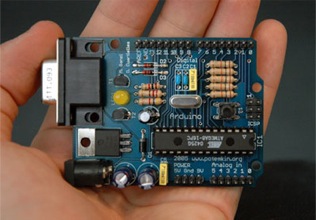
From www.arduino.cc :
Arduino is an open-source electronics prototyping platform based on flexible, easy-to-use hardware and software. It's intended for artists, designers, hobbyists, and anyone interested in creating interactive objects or environments.
Arduino can sense the environment by receiving input from a variety of sensors and can affect its surroundings by controlling lights, motors, and other actuators. The microcontroller on the board is programmed using the Arduino programming language(based on Wiring) and the Arduino development environment (based on Processing). Arduino projects can be stand-alone or they can communicate with software on running on a computer (e.g. Flash, Processing, MaxMSP).
The boards can be built by hand or purchased preassembled; the software can be downloaded for free. The hardware reference designs (CAD files) are available under an open-source license, you are free to adapt them to your needs.
As always,
graymalkin
Some projects I may be making with the Arduino soon include a network media player and some awsome robots, namely a photovore (follows light)… watch this space for code hints and tips on these great projects.
As always,
graymalkin
So, I’m sure you all have installed Windows Seven, if you haven’t do a backup and download it, the 7100 RC build tree bears some minor changes from the 7000 tree, for example the Aero Peak feature has been added to the Alt+Tab window switcher, and a slight change I noticed in the colour of the links bar in the right hand side of control panel apps, from a blue colour like in Vista to a grey colour. I can’t say it is very fetching to be honest but it gets the job done.
There are some new themes in the personalisation menus with added sounds that are really remixes or different styles of the default windows sounds. They have a slight aesthetic quality but I feel this may be unnoticed to most End Users. I really like the new taskbar deign, with the aero peak again built right in so you can see the window in a larger view before committing to clicking on it. You may think that it would be easier to just click it and use trial and error or read the title/tooltip, but it is great for checking the status of say a download in iTunes or even just to abstract from the slight annoyance of trial and error. One thin that may cause people some annoyance with it is the instinct to click on the “aero peak view” but after some use it becomes a truly seamless thing to do.
Something else that I have liked is the use of glass over the entire taskbar, instead of the standard black style with some transparency in Vista or worse the garish blue bar in XP the remodelled “Superbar” as it is now called has a pleasing elegance as it graces the bottom of your screen, I don’t like the larger size of it on lower resolution screens (1024x768 for example) as it takes up far to muck screen real estate. But on a slightly higher res, like 1440x900, the width seems large at first but after some use is perfectly acceptable. The buttons on the taskbar also have a new feel, the start button say: the button looks like the Vista start pearl but is now a bit bigger, when you mouse over a beautifully smooth animation makes the button glow. The application buttons them selves have no text, just the application icon (this can be changed), when you mouse over one the icon lights up from below the colour of the majority of the icon, eg IE would be blue and Windows Media Centre (WMC) is green, etc.
Another feature is jump lists, an icon on the Superbar can be dragged up to revel or a right click can also show it, I presume this is for touch support. The jump list contains commonly used applications and shortcuts. They are also available in the start menu, an arrow appears at the end of a program with a jump list, when hovered over or clicked the jump list make the menu a bit larger and reveals the list in the right of the start menu, where your documents links would be. move the mouse away it disappears.
Some other features are less easily seen. XP mode allows users to run legacy software under a virtual XP machine, unfortunately you need hardware virtualisation technology on your microprocessor, if you have an AMD processor this will not affect you as they have the hardware virtualisation built in, but if you have an Intel chip then you may not have this support, an easy way to find out is to run Steve Gibson’s (of GRC.com) program: securable. It is quick and easy, it tells you if your processor supports DEP 64 bit and virtualisation, mine has DEP and 64 bit but no hardware virtualisation (Intel Pentium Dual Core T2370)
Bottom line, well nearly ;), Windows Seven is great, to get the most out of it you should use a computer with over 256MB graphics RAM and 2GB of standard RAM, this will give you a fast smooth performance and allow all the Aero stuff. Time will tell weather the pricing is right, many hope for around $50, £40, but I feel this is unlikely. If you have decent specs then go ahead and install Seven on a computer somewhere and have a play, the RC is free to download and you can get the product keys legally from MSFT until at least July, so go ahead and download it. If you aren’t sure about 32 or 64 bit versions run securable and check your processor’s support, then go here and get all the details for the download.
As always,
grayamlkin
After some patience and a lot of soldering I have got the connections on the Arduino to be good enough to program it, so after doing the obvious blink I had a quick play around with some of the other features, I have a succession of LEDs blinking as I type this post! I intend to use an LCD panel and an Ethernet shield and create a Twitter feed reader, or at least a small server. future projects include some documentation possibly for SoC or GHOP (Summer of code and Google's Highly Open Participation (contest) respectively) Also with the LCD panel I may make a networkable Media Player and spectrum display.
Any ideas would be greatly accepted, some robotics stuff may be on it’s way but for now I need to learn the C++ language, seems quite easy though, from a C# developer’s POV (Point of View)
I also am doing some client-side (PC based) projects, for example a twitter client and my RSS reader needs continual work to keep the feature set expanding, but all in all things are going well. As soon as I have set up an Appspot account I will publish these and start churning out updates, should be good. Some other things to note are my work with the WiiMote recently, I haven’t done much since the first post but I have at least dug into the library, creating a small application that sets the position of a black square + the wiimote’s X and Y co-ordinates, I managed to do this in VS 2008 pro through the dreamspark scheme, I will also use Expression to start bringing WPF programs to you as well, as soon as this has been done I will post them again to the Appspot, so watch this space for info on my up and coming projects.
As always,
Graymalkin


 Posts
All Comments
Posts
All Comments


